
Buying an eBook or SimNet? Here’s the process!
For Troubleshooting tips, scroll to the bottom of the page.
Step 1:
When purchasing an eBook or SimNet, you will be asked to create a username and password. Remember this username and password as you will need them to log in to your Campus Bookstore account in the future.
Step 2:
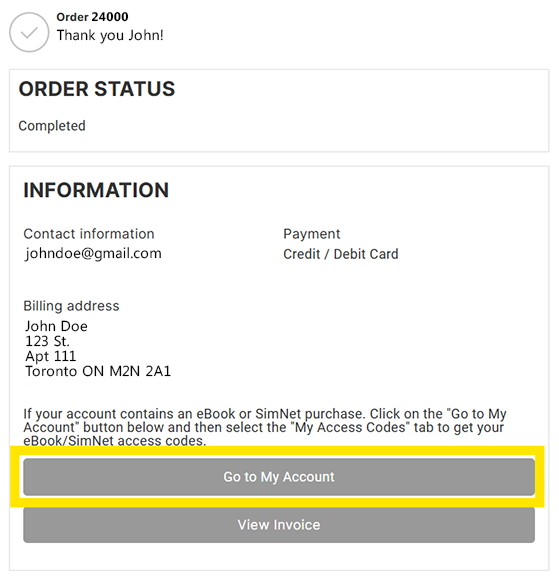
After submitting your order, you will see a Thank You page. Click on the Go to My Account button
Step 3:
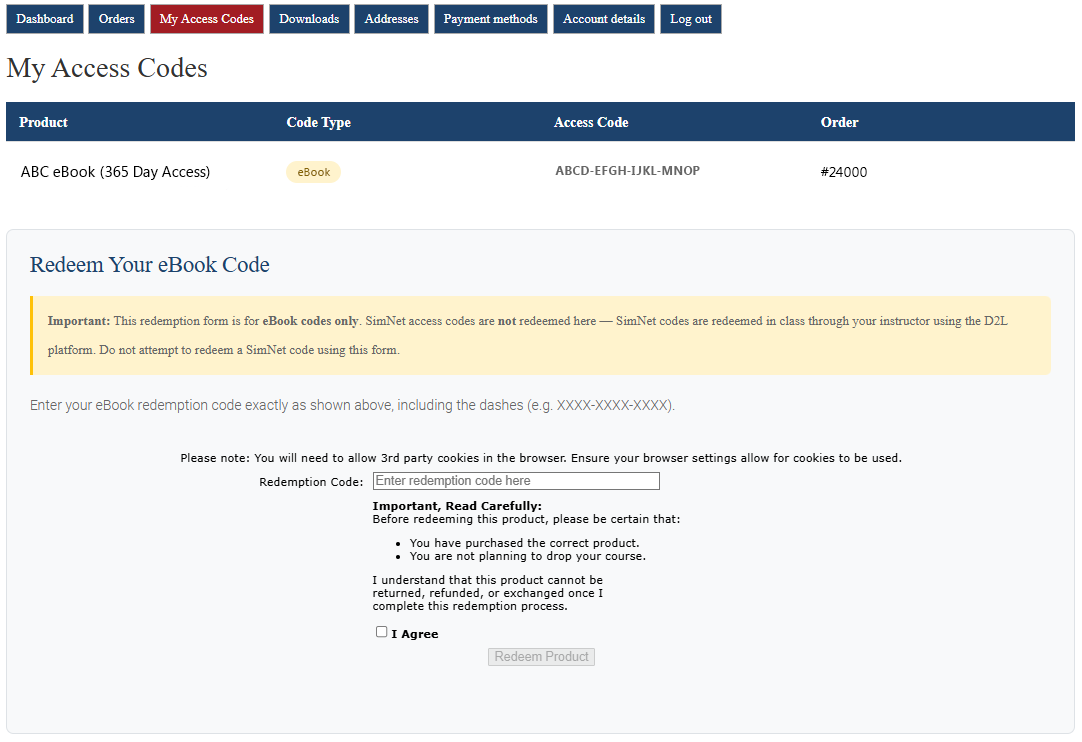
Click on the My Access Codes tab. With each new Ebook or SimNet purchase, you will be asked to complete an Electronic Acknowledgement of Digital Product Delivery form before gaining access to the redemption/access code(s).
- From inside the My Access Codes tab, you will find a list of redemption/access codes for the items you purchased.
- If you purchased SimNet, you will need to wait until you are in class to activate it through the D2L portal.
- If you purchased an eBook, you can redeem the eBook code through the form that appears on the page.
- If you are having an issue redeeming your code READ THE TROUBLESHOOTING TIPS section below.
This is an example of the My Access Codes webpage
Troubleshooting Tips
Campusbookstore.ca IS NOT Campusebookstore.com
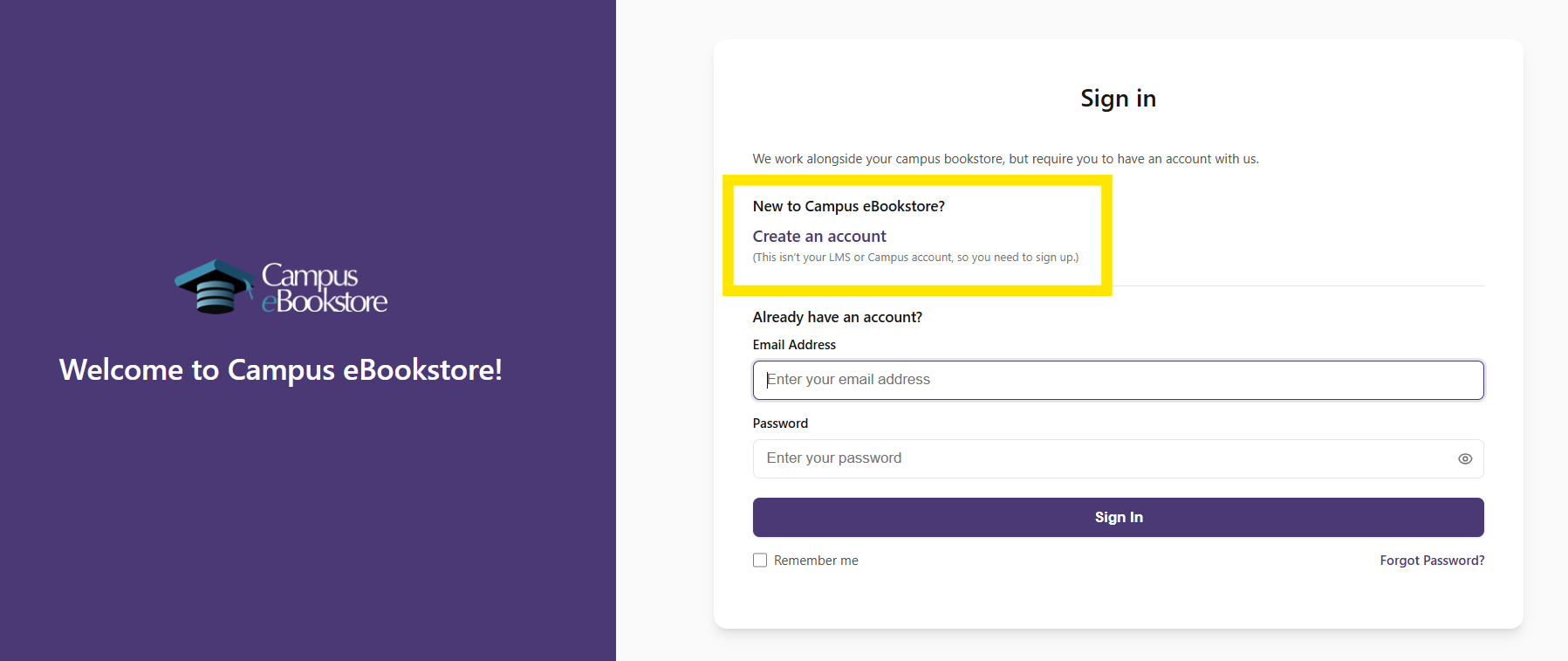
When you enter your eBook redemption code, you might be forwarded to another website called CampusEBookstore.com.
CampusEBookstore is not part of our bookstore. CampusEBookstore is an eBook platform used by eBook companies.
- Your CampusBookstore.ca login will not work on the CampusEBookstore.com website.
- If you have never used CampusEBookstore.com site before, you will need to create a new account.
(See the image below for help.)
Need help accessing your eBook?
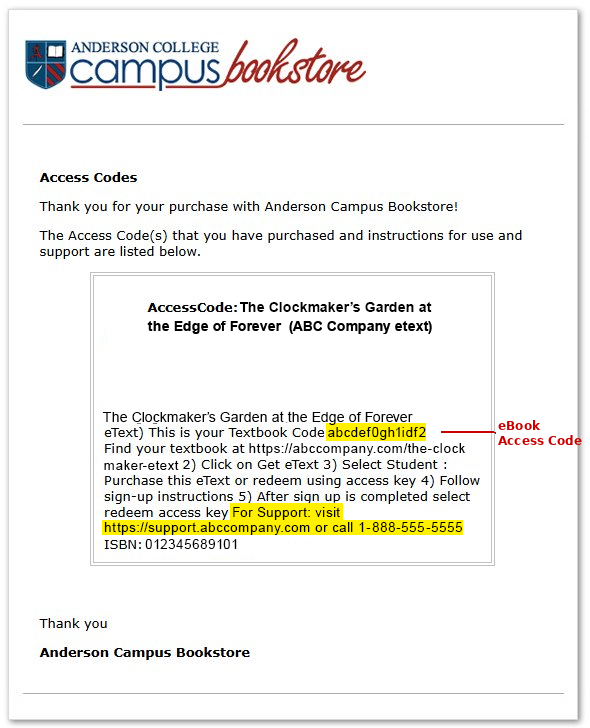
After redeeming your eBook code on the My Access Codes webpage, you will receive an email. That email is from the eBook and company and contains instructions on you how to access and read your eBook. It will look similar to the example image (see eBook Company Email image). With some of these emails, the access code may be a little hard to find because it looks like part of a sentence. Look for the line This is your Textbook Code.
At the bottom of the email, you will find support information. This may include an email address, phone number, or website link.
If you have trouble using your code on the eBook company’s website, you need to contact the eBook company for help. We cannot access any eBook platform to fix issues.
eBook Company Email
(not a real email – for demonstration only)
Need help with SimNet?
Once you get your 18 digit SimNet code, hang on to it! Don’t use it yet. Wait until your class starts — your teacher/instructor will tell you exactly how and when to use it.
Having Trouble with SimNet?
If something isn’t working when you try to activate or use SimNet, reach out to SimNet’s student support team here: 👉 https://mh.my.site.com/CXG/s/ContactUs
The page gives you a few different ways to get help. The chat feature is the best place to start — it’s quick and easy!